---
title: Use Q&A in non-virtual sessions
description: This article describes how you can prepare and use Q&A during non-virtual sessions.
---
[Skip to content](https://knowledge.conferencecompass.com/use-ask-in-non-virtual-sessions#main-content)
English
Show submenu for translations
![floq-logo-by-cc-2-white@2x.png\]](https://knowledge.conferencecompass.com/hs-fs/hubfs/floq-logo-by-cc-2-white@2x.png?height=40&name=floq-logo-by-cc-2-white@2x.png)
Open main navigation
Close main navigation
- English
Show submenu for translations
- www.conferencecompass.com
www.conferencecompass.com
Hello. How can we help you?
- There are no suggestions because the search field is empty.
1. [CC Knowledge Base](https://knowledge.conferencecompass.com/?hsLang=en)
2. [For moderators, speakers and representatives](https://knowledge.conferencecompass.com/for-moderators-speakers-and-representatives?hsLang=en)
3. [Vote & Ask moderators in non-virtual sessions](https://knowledge.conferencecompass.com/for-moderators-speakers-and-representatives?hsLang=en#vote-ask-moderators-in-non-virtual-sessions)
# Use Q&A in non-virtual sessions
## This article describes how you can prepare and use Q&A during non-virtual sessions.
In this article, we describe the workflow to use Q&A for non-virtual sessions, where attendees ask questions from the web app or the mobile app, and not from virtual rooms. For virtual and hybrid sessions, read the articles for [virtual moderators and speakers](https://knowledge.conferencecompass.com/speaker-dashboard?hsLang=en#interactive_features).
We assume that the organiser has sent you an invite link to moderate the session and that users have access to the Interactivity tab. If this is not the case, read the [article in the For Organisers section](https://knowledge.conferencecompass.com/enabling-and-sending-invites-for-non-virtual-vote-ask?hsLang=en) about the setup.
Take the following steps in preparing and using Q&A:
1. [Access the dashboard](https://knowledge.conferencecompass.com/use-ask-in-non-virtual-sessions#accessdashboard)
2. [Manage questions during a session](https://knowledge.conferencecompass.com/use-ask-in-non-virtual-sessions#managequestions)
3. [Upvoting](https://knowledge.conferencecompass.com/use-ask-in-non-virtual-sessions#upvoting)
4. [Show presentation on the presentation screen](https://knowledge.conferencecompass.com/use-ask-in-non-virtual-sessions#showpresentation)
### Access the dashboard
To access your dashboard, follow the steps in [this article](https://knowledge.conferencecompass.com/how-to-access-your-backstage-dashboard?hsLang=en).
### Manage questions during a session
Questions that come in are listed on the Q&A tab. Questions come in on the Invisible tab by default, meaning they are not visible to the audience. There are two ways to sort the questions:
- Newest first: the questions that came in last are shown at the top of the page
- Most popular first: the questions with the most likes are shown at the top of the page.
#### Make questions visible to the attendees
When you make a question visible, it is shown on the Ask card on the web and mobile app. Attendees will then be able to click the heart to like the question (see [Upvote](https://knowledge.conferencecompass.com/use-ask-in-non-virtual-sessions#upvoting) section below). Visible questions are also shown on the [presentation screen.](https://knowledge.conferencecompass.com/use-ask-in-non-virtual-sessions#showpresentation)
To make a question visible, click the eye icon. The question will move to the section *Visible questions*. You can mark multiple questions as visible. Make sure not to mark too many questions at the same time to keep it readable for attendees.
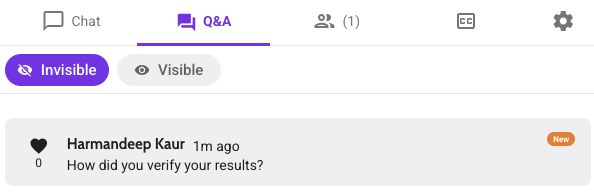
Other options that are available for a question are:
- **Get info** will give you more information about the question, for example, who sent it and what time exactly it was sent.
- With **Edit**, you can edit a question that came in, for example, to correct a typo.
- **Delete** deletes the question. You can use this option to remove questions you won't be answering or questions you've already answered.
### Upvoting
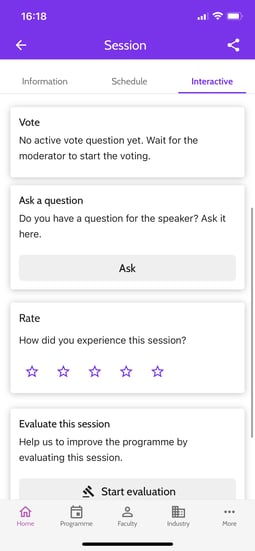
To help you decide which questions to answer, you can use the upvoting functionality. Besides asking new questions, users can then also like questions that other people have asked. To do so, they need to click the heart next to a question in the app.
Users can upvote all questions set to *Visible*. After someone has voted, the number of likes is updated immediately, both in the app and in Eureka. This way you can easily see which question has been voted for the most.
### Show presentation on the presentation screen
To show the questions that were asked to your audience, use the presentation screen.

This presentation screen is a URL that should be opened in a separate browser window. You can find the URL in the session settings top right.

Click *Copy* in the *Presentation link* block to copy the URL. Open a new browser window and paste the URL there.
Make sure your second (presentation screen) is an extension of your computer's screen, not a copy.
- **Windows**: Press Win + P until *Extended* is selected.
- **MacOS**: Click the Apple menu () and choose *System Preferences*. Choose *Displays* and click the *Arrangement* tab. Make sure that *Mirror Displays* isn't selected.
Once this is set up, you can just drag the Presentation window to the presentation screen and maximise it there. It does not matter from which computer the questions are moderated.
- [For organisers](https://knowledge.conferencecompass.com/for-organisers?hsLang=en#main-content)
- [Artwork guidelines](https://knowledge.conferencecompass.com/for-organisers?hsLang=en#artwork-guidelines)
- [Floq Event Registration](https://knowledge.conferencecompass.com/for-organisers?hsLang=en#floq-event-registration)
- [Set up your app and add events](https://knowledge.conferencecompass.com/for-organisers?hsLang=en#set-up-your-app-and-add-events)
- [Configure your event](https://knowledge.conferencecompass.com/for-organisers?hsLang=en#configure-your-event)
- [Community and attendees](https://knowledge.conferencecompass.com/for-organisers?hsLang=en#community-and-attendees)
- [News messages](https://knowledge.conferencecompass.com/for-organisers?hsLang=en#news-messages)
- [Interactive features](https://knowledge.conferencecompass.com/for-organisers?hsLang=en#interactive-features)
- [Virtual sessions](https://knowledge.conferencecompass.com/for-organisers?hsLang=en#virtual-sessions)
- [Sponsors](https://knowledge.conferencecompass.com/for-organisers?hsLang=en#sponsors)
- [Integrations](https://knowledge.conferencecompass.com/for-organisers?hsLang=en#integrations)
- [Advanced features](https://knowledge.conferencecompass.com/for-organisers?hsLang=en#advanced-features)
- [App promotion](https://knowledge.conferencecompass.com/for-organisers?hsLang=en#app-promotion)
- [Analytics](https://knowledge.conferencecompass.com/for-organisers?hsLang=en#analytics)
- [Download your event info](https://knowledge.conferencecompass.com/for-organisers?hsLang=en#download-your-event-info)
- [Off-boarding](https://knowledge.conferencecompass.com/for-organisers?hsLang=en#off-boarding)
- [For moderators, speakers and representatives](https://knowledge.conferencecompass.com/for-moderators-speakers-and-representatives?hsLang=en#main-content)
- [Vote & Ask moderators in non-virtual sessions](https://knowledge.conferencecompass.com/for-moderators-speakers-and-representatives?hsLang=en#vote-ask-moderators-in-non-virtual-sessions)
- [Representatives](https://knowledge.conferencecompass.com/for-moderators-speakers-and-representatives?hsLang=en#representatives)
- [Technical moderators (AV) for virtual and hybrid sessions](https://knowledge.conferencecompass.com/for-moderators-speakers-and-representatives?hsLang=en#technical-moderators-av-for-virtual-and-hybrid-sessions)
- [Moderators, speakers and hosts in virtual sessions](https://knowledge.conferencecompass.com/for-moderators-speakers-and-representatives?hsLang=en#moderators-speakers-and-hosts-in-virtual-sessions)
- [For attendees](https://knowledge.conferencecompass.com/for-attendees?hsLang=en)
- [Release notes](https://knowledge.conferencecompass.com/release-notes?hsLang=en#main-content)
- [Latest versions](https://knowledge.conferencecompass.com/release-notes?hsLang=en#latest-versions)
- [Older versions](https://knowledge.conferencecompass.com/release-notes?hsLang=en#older-versions)
- [Publish apps on the stores](https://knowledge.conferencecompass.com/publish-apps-on-the-stores?hsLang=en#main-content)
- [Create accounts](https://knowledge.conferencecompass.com/publish-apps-on-the-stores?hsLang=en#create-accounts)
- [Create app certificates and keys](https://knowledge.conferencecompass.com/publish-apps-on-the-stores?hsLang=en#create-app-certificates-and-keys)
- [Create build file and screenshots](https://knowledge.conferencecompass.com/publish-apps-on-the-stores?hsLang=en#create-build-file-and-screenshots)
- [Submit your app to the Stores](https://knowledge.conferencecompass.com/publish-apps-on-the-stores?hsLang=en#submit-your-app-to-the-stores)
- [Transfer apps](https://knowledge.conferencecompass.com/publish-apps-on-the-stores?hsLang=en#transfer-apps)
- [Offboarding](https://knowledge.conferencecompass.com/publish-apps-on-the-stores?hsLang=en#offboarding)
- [About Conference Compass and Floq Event Management](https://knowledge.conferencecompass.com/about-conference-compass-and-floq-event-management?hsLang=en)
[](https://www.conferencecompass.com/)
Copyright © 2026, Conference Compass