![floq-logo-by-cc-2-white@2x.png]](https://knowledge.conferencecompass.com/hs-fs/hubfs/floq-logo-by-cc-2-white@2x.png?height=40&name=floq-logo-by-cc-2-white@2x.png)
17 September 2026
Features & Improvements
Recordings
- Programme items now support uploading an MP4 recording directly, alongside the existing option to link a platform recording. The uploaded file is added to Files & Media under session recordings for later reuse or renaming. In the web app and mobile app, it plays in the on-demand room just like other recordings, so that users do not have to leave the app.
- Trimming a recording now uses a dedicated, draggable play line instead of relying on clicks inside the play area, so playback can start from an exact point without accidentally shifting the trim handles. The grab area around the line is wider than its visible width for easier dragging.
Other
- Sponsor banners shown above list, navigation, daily programme, and floor plan pages now report views, unique viewers, and clicks, with the same figures reflected in the analytics dashboard and the data export.
Bug Fixes
- YouTube Shorts links now show a preview in the web app's video widget and in news messages, and in the studio's video widget preview, matching the support already available on mobile.
- Attendee engagement analytics no longer show duplicate entries or an inflated number of anonymous users, so app user counts more closely reflect actual usage.
- The Import button for adding members is visible right away when creating a new chat group, instead of only appearing after the group is saved and reopened for editing.
- The search field for adding scavenger hunt items clears automatically once an item is selected, ready for the next entry without manual clearing.
- When editing or deleting an existing vote question in the moderator dashboard, the intended modal is opened instead of activating the vote.
10 September 2026
Features & Improvements
Group chats
- Opening a public group chat created in Studio that you haven't joined yet now shows the same join prompt used elsewhere. Declining and then sending a message in the chat still adds you as a participant.
- The group chats section in Studio now includes an introductory sentence explaining what group chat topics are, and the "Add group chat" button has been relabelled to "Add group chat topic" for clarity.
Data types
- Tabs within a data type can now be access-restricted to event groups as well as community groups, matching the group options already available for restricting page access.
- The Side panel banner label in a data type's image settings has been renamed to Banner, with clearer description text explaining it's the default image shown above the programme item name on the detail page.
Other
- The note card now shows a preview of up to five lines and resizes to fit the note's length. A "Read all" button only appears when the note is too long to fit in the preview.
- You can now not only link to Vimeo and YouTube, but also to an mp4 file you've uploaded elsewhere, for example on your own website or in our Files & Media library. These render as a playable video above the message with a timeline, play/pause, mute, and fullscreen controls, matching how YouTube and Vimeo links already work.
- Swiping between timeframes in the daily programme now also moves between days: swiping right on the last timeframe of the day opens the next day, and swiping left on the first timeframe opens the previous day. Additionally, the day selector is now scrollable for events longer than six days, so all days, including the ones past the sixth, can be selected.
Bug Fixes
- Editing the title, subtitle, or message text of a scavenger hunt card in the studio no longer changes its QR code, so previously printed codes keep counting toward the achievement.
- When multiple fields are edited in one and the same Excel file , such as a session's start and end time, aboth fields are now locked, instead of only the second one.
- The Schedule tab in an exhibitor's profile now shows programme items under the correct date, instead of shifting items to the previous day for events happening in another timezone.
- Session reminders now work as expected: they show a push notification when the app is closed or in the background, and an in-app notification when it's open. If you're not in the related event yet, tapping the notification opens a modal where you can click to open it, and next, the detail page of the session that starts opens.
- Sending a message in a group chat no longer marks that conversation as having an unread message for the sender.
- Exhibitor booth pages with a slideshow image and no tab content no longer show an incorrect "no access permission" message.
- On iOS, zooming into a floorplan pin located near the top edge no longer causes the map to keep recentering.
- The line height of the titles for items that are happening now, is now correct on Android.
- The Digital badge item in the mobile profile menu now has the same padding and margins as the other menu items.
- The news message detail panel on the right of the the web app, that opens after clicking Read more, is now scrollable.
31 August 2026
Features & Improvements
Group chats
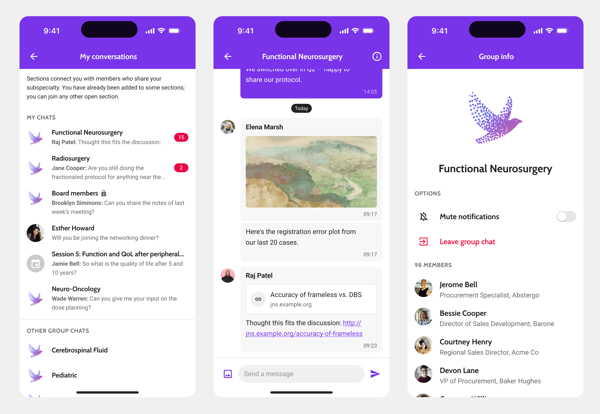
A new group chats feature lets admins create chat topics per event, each with its own icon, name, subtitle, and member list from a dedicated section. Chat groups can be public, allowing anyone to join, or private, so that only members that are added in the studio will be able to access it. Members can be added individually or imported in bulk from an Excel sheet with a downloadable template.
The group chats are accessible through the My conversations page that can be opened from the profile. This page has a section that shows all private chats, session chats, industry chats and group chats you have already joined, and a section for public group chats that are open for joining.
Members of a chat receive notifications when a new message is posted in the group. They can mute these notifications, can also leave a chat and browse a paginated member list from the group chat info page.
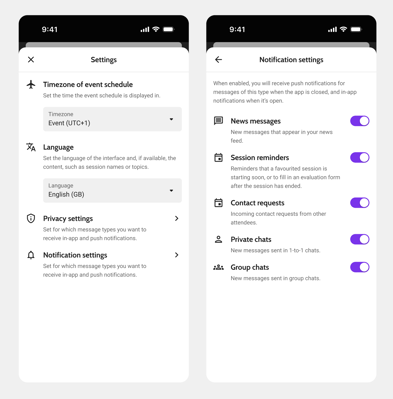
Notification settings
The notification settings in the mobile app have been updated to allow for more granular notification delivery. Attendees can independently control notifications across five categories (news messages, session reminders, contact requests, private chats and group chats) via new toggles in the Settings page. When enabled, in-app notifications are sent when the app is open, and push notifications are sent when it's closed. The in-app notification style has been updated to be more informative.
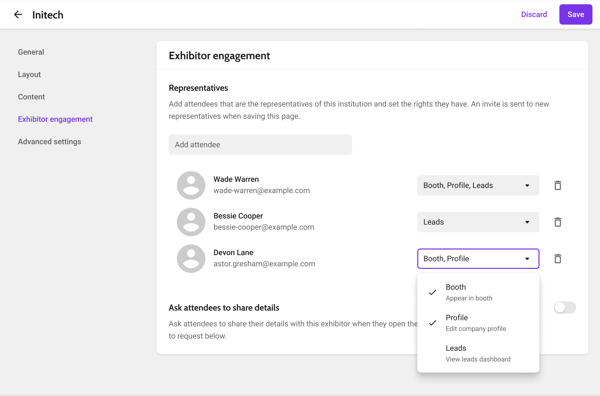
Customise rights per representative
Instead of one set of rights for all representatives of a company, they can be granted individual rights: appearing in the booth, editing the company profile, and viewing leads. Dependingon the rights the signed-in user has, they will see different tabs in their dashboard and will or will not appear in the exhibitor booth that attendees see.
Create society tiles from icon and name
Society-level info, community, social wall, event list, topical chat, and news tiles can now be created from an icon, name, and background colour instead of only an image, similar to event navigation buttons.
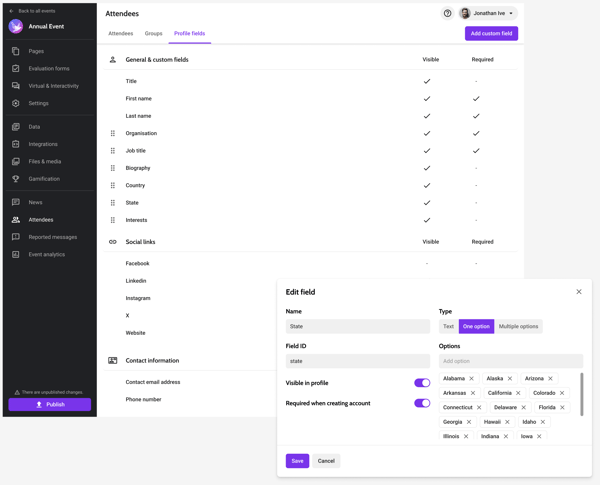
Choose visible and required attendee profile fields
Per event, you can now choose the available fields users see in their profile and the order they are in. You can choose what fields are required for creating an account; instead of always job title and company.
This can be set up on the Attendees page, tab Profile fields. Custom fields can be added from this page as well.
Templates
- New events created from the default template now include a Home item in the side menu by default, preventing the blank webapp that previously occurred when no menu items were configured.
- Event templates now retain their selected Happening Now and Search page settings, so new events created from a template start with the same selections.
Other improvements
- Profile pictures on a user's public profile can now be tapped to open and zoom in, matching how images already behave on the news feed.
- The redundant "New news message" prefix shown before news and targeted messages in the notification center has been removed on both web and mobile.
- Internal links to places, are now supported on the mobile app. When you add such as link, the app opens the floor plan with the location selected. You can use this for example to link directly to the location from an info page, or add them as items in a scavenger hunt.
Bug Fixes
Access restriction
- Single-event apps can now be restricted to an attendee group, instead of only to the attendee list.
- Password-protected pages now correctly show their password prompt when linked as a tab on a navigation page or as a bottom navigation item or on a tab, instead of skipping it.
Other
- Batch-pinned floorplan booths now land precisely at the clicked location, matching the accuracy of pins placed individually — especially noticeable on closely zoomed floorplans.
- The Part of schedule field no longer shows as locked after a sheet re-import when the underlying parent value hasn't actually changed.
- Scavenger hunts with a long piece of text in the reward field now save successfully instead of failing with an error.
- The My profile buttons now respond correctly when the page is linked to the app's bottom navigation bar.
- Descenders of letters in Android navigation buttons, such as "Programme" and "Networking", are no longer clipped at the bottom edge of the button, so labels now display fully and centered.
- The web app's schedule pages now show a loading indicator instead of a blank screen while content loads.
3 August 2026
Features & Improvements
- A new Settings page type can now be selected from anywhere a pages is linked. Since the page isn't supported on the web app, a warning appears if it's linked there.
- The My achievements page now has configurable title and subtitle fields in the Networking & Profile settings instead of the title coming only from language strings.
- The gamification leaderboard tab now has a Reset all scores button that clears every attendee's score back to zero, while keeping existing achievement configurations intact.
Bug Fixes
- A logo can now be uploaded on the Settings page, Sign in tab, for the screen that briefly appears after signing in through a custom login.
- Searching the attendee list by first and last name together now returns matching results instead of failing after the space.
6 August 2026
Features & Improvements
- The Files & media section in the studio now accepts multiple files at once instead of requiring them to be added one at a time.
- Poster and slide files now display their configured name and icon on web and mobile, instead of showing only the raw file name.
Bug Fixes
- Installs and updates that previously failed for events with certain translation data now complete successfully, resolving the app becoming unusable after an update.
16 July 2026
Features & Improvements
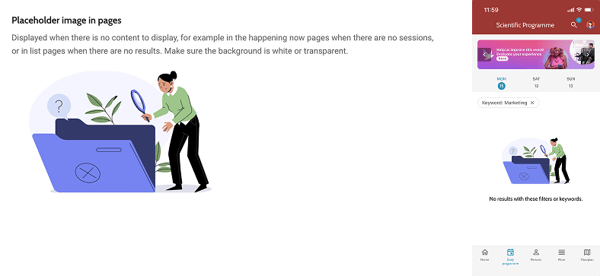
- Empty lists across the app, for example favourites, notes, check-ins, contacts, conversations, and more, now allow uploading a custom image instead of our default images. The image can be uploaded in the event settings, tab General.
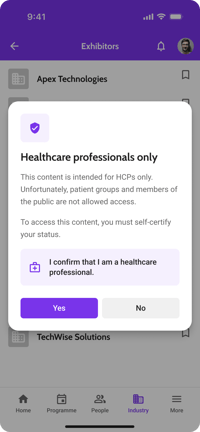
- We've added the option that requires attendees to confirm that they are a Healthcare Professional to view an exhibitor's page. The feature can be enabled per data type, and will then show a modal for every exhibitor of that type.
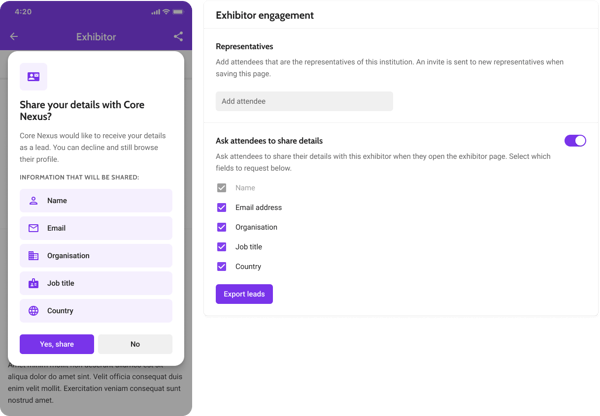
- A new feature was added that allows retrieving lead details from the app when they access an exhibitor's page. Within an individual exhibitor's page, you can enable the option Ask attendees to share details, and then toggle on what details you want to ask for. The leads can then be exported per exhibitor from the studio. Note that you will need to have lead management enabled in order to enable the modal.
- Reported messages at the society level now have a separate tab for the social wall. Viewing, ignoring and deleting posts and messages works the same as on event level.
Bug Fixes
Excel import
-
Attendee upload errors involving text in the phone number field now identify the specific row with the problem instead of a generic file-wide error.
-
Bulk-imported backstage access users now automatically receive an invite email the first time they're added. This is also displayed in their history.
App building
- Uploading a JPG welcome screen image now shows a clear error message instead of leaving the build running indefinitely.
- Colour fields in App Building, Event Settings, and Pages now validate hex codes when saved, preventing invalid colours from causing builds to fail.
Other
- The cookie consent message now accurately reflects that no third-party cookies are used, and the close button has been removed since cookies can't be declined.
- Session times no longer shift by an hour automatically when typed in and saved in the studio.
- App news message views are no longer incorrectly counted in event feed analytics.