![floq-logo-by-cc-2-white@2x.png]](https://knowledge.conferencecompass.com/hs-fs/hubfs/floq-logo-by-cc-2-white@2x.png?height=40&name=floq-logo-by-cc-2-white@2x.png)
30 June 2026
Features & Improvements
-
The web app loading screen now shows a more clearly animated/indicative loading icon, so embedded pages (e.g. on a client's own website) no longer appear stuck while loading.
Bug Fixes
-
The top menu is now correctly hidden when loading a web app page with
?mode=embedin the URL, matching the existing behaviour for the side menu layout. -
The video camera icon for hosted virtual or on-demand rooms no longer incorrectly appears on the Schedule tab detail page when the room button visibility setting is set to Hide.
-
The cc:// link to an evaluation form from the Info section on the web app now correctly opens the form in the side panel instead of doing nothing.
- Speaker placeholder images uploaded in the studio are now correctly displayed in the moderator dashboard and in session recordings, matching their visibility in the attendee dashboard.
29 June 2026
Features & Improvements
Support for multiple languages in the event app
Besides the interface texts, now also content can be translated to multiple languages. Whenever more than one language is active in your event, a section or button Translations appears in the following places: the home page, the data types, pages and data objects.
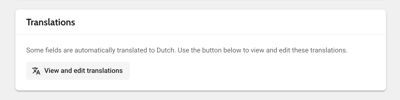
Depending on the content you are translating, different fields are available when you open this page. The fields are auto-translated, but can be manually edited and are then locked, so that they are not overwritten with another auto-translation.
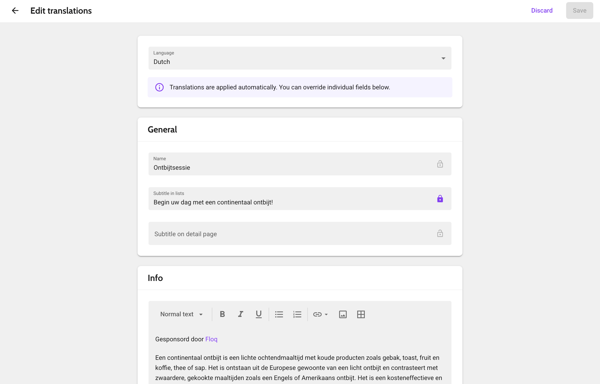
When you then change the app language through the settings, all content is then translated to the selected language.
Excel import/export
-
When importing info fields via Excel, the studio now automatically detects whether the content is plain text or HTML and sets the correct editor mode accordingly, ensuring formatted content such as abstracts and posters is displayed properly.
-
Import error messages for incorrect date or time formats and for id's that are not unique across the event are now more descriptive instead of showing a generic error.
- The Excel export now processes asynchronously, allowing large exports to complete without hitting the API timeout limit.
Other
-
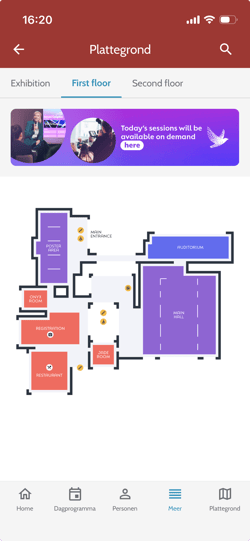
Besides on daily programme pages, navigation pages and information pages, you can now also add a slideshow banner on floor plan pages. The banner can be different per tab and is displayed in both the web app and the mobile app.
-
Institutions without an order name now automatically get one derived from their display name (lowercased, stripped of spaces and special characters), ensuring consistent and correct alphabetical sorting across the studio and app.
-
When sending a batch representative invite from the attendee list, the action is now correctly recorded in the attendee's history.
-
The Create combined video option has been removed from the session recordings menu as it was not yet functional, to avoid confusion.
Bug Fixes
-
After making a sponsor banner visible, the home screen in the studio and app no longer shows a leftover empty tile or gap.
-
When using batch edit to assign hosts or speakers, the Backstage access section now correctly shows the attendee name rather than the linked person name.
- Tags with icons on the web app no longer push the tag label too far to the right, causing it to be cut off; the text is now correctly aligned and fully visible.
15 June 2026
Features & Improvements
App building
- The icon preview backgrounds for iOS, Android, and Welcome screen icons are now grey instead of white, making it clear when an icon has been uploaded even if the image itself is white with transparency.
-
The test version QR code is now hidden when build properties are modified, and appropriate warnings are shown when navigating back to a previous step or submitting a build with no changes.
- The "Updated on" timestamp in app building now correctly reflects the date of the last submitted build or configuration change, rather than always showing when app building was opened.
Other
-
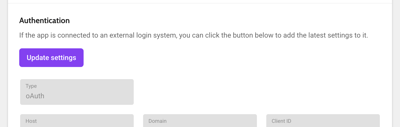
The "Update settings" button in App Settings for custom login now correctly fetches the latest login settings from Eureka instead of doing nothing.
Bug Fixes
Templates
-
Events created from the default template that are refreshed in the first few seconds they are created, no longer contain duplicate pages (e.g. two attendee lists or two social walls); only one of each is included.
-
Info pages from templates that were deleted in the studio no longer appear in mobile app search results; deleted pages are now properly cleaned up.
- Grid layout pages from templates now correctly carry over their grid layout when creating a new event, instead of reverting to a list layout until manually toggled.
Other
- App languages in the App Settings language page now load correctly.
-
When setting the virtual room type and inviting speakers via batch edit, the section is now correctly locked so that subsequent channel runs no longer overwrite the room type and remove the speaker invites.
4 June 2026
Features and improvements
Context-sensitive captions
We released the context-sensitive captions, with which you can improve captioning accuracy. By default, the names of any person and institution that has a role in the session, is fed as a so-called custom phrase to the system. The custom phrases will ensure they are read correctly by voice/transcription services. Besides the names, you can also enter more event-specific terms in the advanced event settings.
Other
-
Evaluation forms on the web app now save progress when navigating away, and show a warning to prevent accidental loss of answers.
-
Achievement cards on the web app no longer have a hover state or open a detail page, as all achievements now have a single level.
-
The "Drop your business card" input and button are no longer visible to users who are not signed in; a sign-in prompt is shown instead.
Bug fixes
-
Importing and exporting institutions via Excel no longer gets stuck on "verifying data" or indefinite loading because of a time-out.
-
Batch adding tags to more than 100 selected items no longer causes infinite loading; tags are now correctly applied.
-
Tag filters copied from a template to a new event are now automatically removed from list pages, since the tag data is not carried over with the template.
- After toggling the visibility of a question on the moderator dashboard, the eye icon now correctly appears on hover for other questions without requiring a tab switch.
- Resources (programme items, persons, institutions) without an icon can no longer be favourited.
2 June 2026
Features and improvements
News
-
News messages on both society and event level can now be imported via an Excel spreadsheet. Download a template from the page, fill it in and upload it. After choosing if the times in your sheet are in the event timezone or the local timezone, the upload process is similar to uploading data items or attendees. Please note that you will still need to manually add any images to include, and set for which of the messages you want to send a push notification.
-
When creating a news message or targeted message, you can now also see its preview. A button is located directly below the text editor on both event and society levels, allowing users to review the layout before finalizing the message.
Other
- The color picker interface has been updated to remove the alpha transparency (A) option and to allow users to directly type hex values into the input field.
- When trimming a session recording, the accuracy and control responsiveness have improved, ensuring video playback, play point positioning, and final cropped files align with the selections made in the modal.
- The default event templates have been updated to replace the placeholder "Information page" with a pre-configured "Coming soon" page that provides clear, minimal text for upcoming events.
- When editing a scavenger hunt, a warning confirmation is now shown when you try to save your changes, ensuring users are aware that attendee scores will be reset to 0 before proceeding.
Bug fixes
Data
- When importing institutions with Excel, missing columns in the uploaded Excel sheet no longer overwrite existing data. Field information is only cleared when the column is explicitly included with empty values.
- The session status now also displays the "Edited" pencil icon, that indicates that a channel object was edited, when an imported session is manually linked to an institution through the institution detail page.
- When multiple booths are assigned to a single institution, the exhibitor details are correctly populated across all linked places, that the exhibitor is linked to each opf the booths on the floor plan.
Other
- When you replace a side panel background image through the exhibitor dashboard, it is now instantly visible on the studio detail page. Before, the previous image remained visible until it was accepted.
- Password reset confirmation emails triggered from the mobile app have been updated to include the correct event branding, headers, and colours instead of the default.
- When searching in the event list, using multi-word queries in any order are now also supported, ensuring that events containing all searched words in their titles are correctly returned.
18 May 2026
Features and improvements
Scavenger hunt
In the gamification suite, a new feature Scavenger Hunt is now available. This feature allows you to create QR codes to specific objects within the app, and allow attendees to scan these codes to complete the achievement. You can also export an overview of what user scanned what code.
When adding a scavenger hunt, you can specify its general details: its name and subtitle, which will be shown to attendees, how many QR codes should be scanned and the number of points attendees will receive when completing the achievement. In the Items section, you can select the items you want to create QR codes for. This can be programme items, persons, institutions or tags. 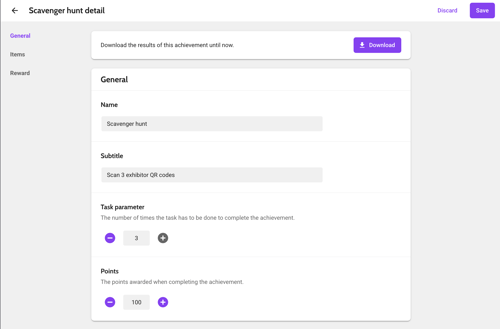
To view the QR codes participants need to scan, click the QR code icon  next to the item's name. You can then copy the code to your clipboard, or save it to your device. Optionally, you can also set a reward, consisting of a title, subtitle, video or image, and URL, that attendees will be able to open or view after completing the achievement.
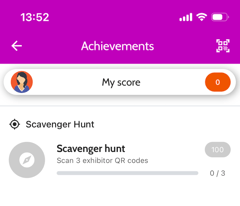 In the mobile app, attendees will see the achievement in their list of achievements, which can be opened from the profile menu. They can open a QR code scanner from the top right of this page. To make it easier to access the scanner, you can also add a navigation button for it on the home page. All they then need to do is scan the QR codes number of items from the list.
Pages
-
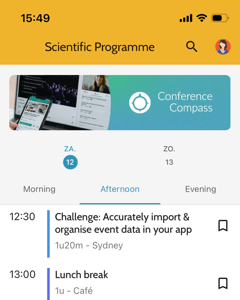
Just like on list and navigation pages, you can now add one or multiple slideshow images (1280x320) on daily programme pages.
- You can now link a menu item, navigation page or navigation button not only to My programme, which contains all programme items, but also to My favourites, which contains institutions, persons and tags.
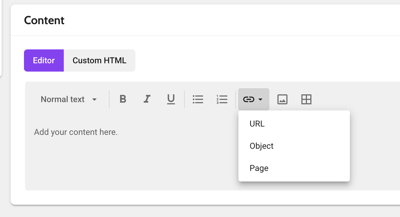
- The HTML editor now includes a dropdown for links, allowing users to directly select and insert links to Objects or Pages via a searchable list, eliminating the need to manually copy and paste IDs or URLs.
Other
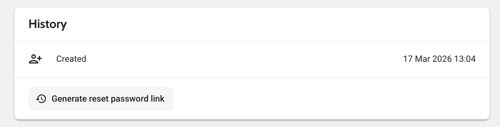
- You can now generate and copy a password reset link directly from the attendee detail page. This allows you to assist users who are unable to receive automated emails without having to delete and recreate their accounts. You can find it at the botton of the page, below the attendee's history.
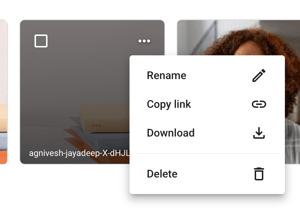
- A new Download option has been added to the image, icon, and file dropdown menus, allowing users to save assets directly without needing to use the bulk selection toolbar.
- When importing representatives with Excel, a warning is now displayed if a representative’s email address is not found on the attendee list, ensuring users are alerted when a representative fails to link to an institution.
- Evaluation forms can now be submitted by attendees that are not signed in. A cookie is placed on the user's device, to prevent them from filling it in multiple times.
- When duplicating an event, you will now see a status alert above the event list. The new event is only accessible once the process is fully complete, preventing errors caused by accessing unfinished event copies.

Bug fixes
- Fixed an issue where the date picker would automatically close when a field contained a validation error.
- Fixed an issue where slideshow images for institutions in duplicated events were missing from the mobile app despite being visible in the web app and studio.
30 April 2026
Features and improvements
-
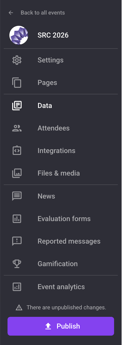
The order of the side menu within an event has been update to a more logical order. The first section reflects the setup of the event, the second the data and attendees, then the interactive features and finally the post-event features.
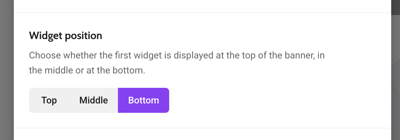
- A new setting Widget position was added in Pages > Home > Settings. With this setting, you can decide where the first widget is placed: Top (at the top of the page, on top of the page banner), Middle, or Bottom (the current layout). Please note that when using the Top setting, you cannot put the event name on the home page as there is no space for it.
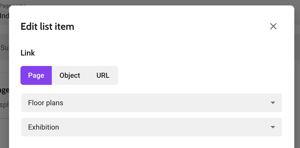
- You can now select a specific floor plan tab when linking to a Floor Plan page. When you for example have many different floor plan images, you can make it easier for attendees to find their way around by creating a navigation page of which each of the items link to one of the floor plan tabs. Another use case is to directly link the Exhibition hall from an Industry page or a navigation button on the home page. By default, the first tab is selected for backwards compatibility.
- For the Additional fields that you can configure on the Attendees page, you can now choose the types One option and Multiple options. When doing so, you can add the set of options attendees can choose from.
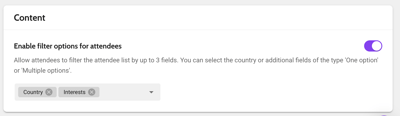
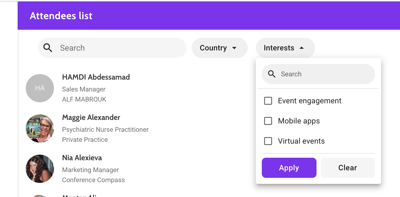
Additional fields of the type One option and Multiple options can then be added as a filter on the attendee list. In Pages > Networking & profile, select Attendee list and choose Enable filter options for attendees.The field will then appear as a dropdown filter on the attendee list, containing all the values you've added.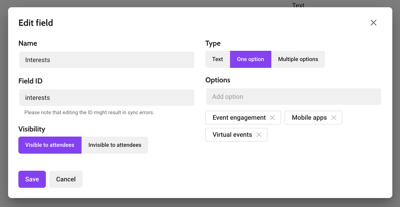
- The web app performance has been improved: the programme pages load much faster now.
- The gamification leaderboard is no longer a default tab on the My Achievements page. You can still include a link to the leaderboard from a navigation page or navigation button on the home page.
Bug fixes
- Virtual rooms now correctly default to your preferred microphone rather than the first in the list, and your selection will be saved so that it's remembered when you refresh or re-enter the room.
- Placeholder images that are updated now correctly appear in on-demand recordings, instead of a black screen.
21 April 2026
Features and improvements
- Attendee sync settings now include descriptive subtitles for each field to make clear what can be filled in in the field.
- Event templates now include evaluation forms and their questions and options, so that these are also preserved when creating a new event based on this template.
- The setting Process releases for faster updates has been removed from Advanced event settings as it is no longer required in the new studio.
Bug fixes
- PDFs uploaded via the speaker dashboard now correctly appear in the Roles and Resources export.
- The My exhibitor profiles button in representative invitation emails is now correctly linked, including hover effects to indicate the hyperlink is active.
7 April 2026
Features and improvements
Gamification
Setting up gamification has become much easier and straight forward. You can access it through the side menu: if it's not yet on, you will see placeholder that directs you to the event settings, where you can enable it.
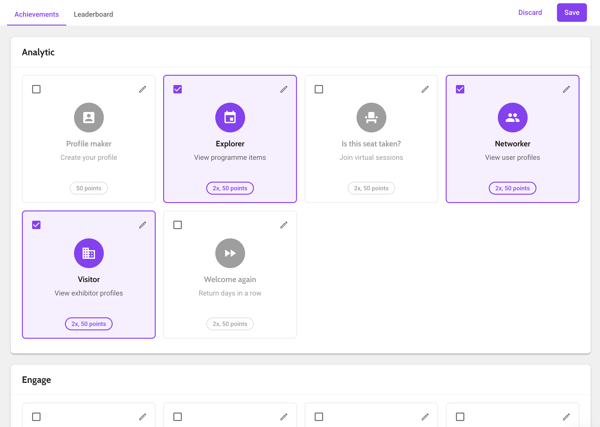
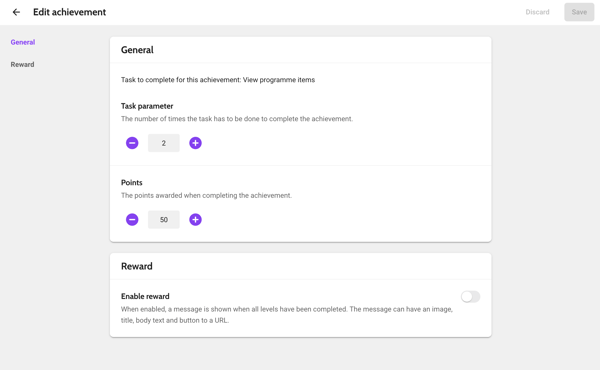
On the tab Achievements, ou can quickly set up your achievements by enabling them with the checkbox on the top left. Click the pencil at the top right to edit the achievement. Please note that editing these will reset the scores and achievements of all users, so make sure to set it up before making your event live!
-
Task parameter: the number of times a task needs to be done in order to complete the achievement
- Points: the number of points the attendee should receive when the achievement is complete.
- Reward: optionally, you can show attendees a message with an image, title, body and URL after they've completed the achievement.
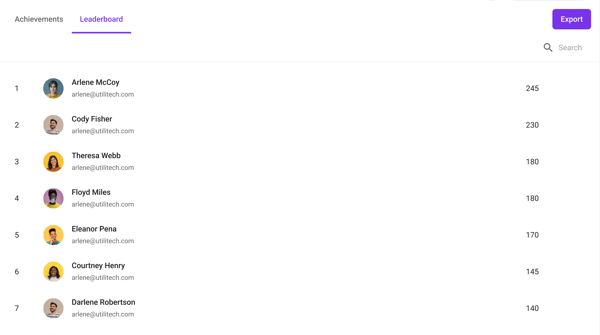
On the tab Leaderboard, you can view the current scores of all users. In the export, you can see each user's total score and which achievements they have completed.
Other
- The layout of the pages to confirm your account and to reset your password have been updated.
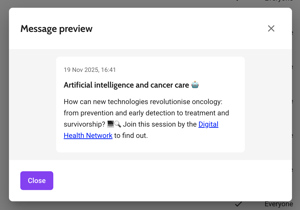
- You can now check a preview of your news message from both the table and the detail page. In the table, click ... and choose Preview. On the detail page, click the Preview button that can be found below the text input field.
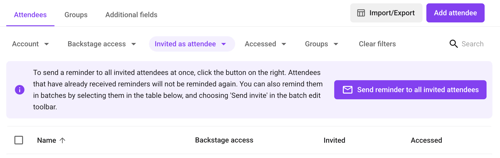
- Besides batch-inviting users, you can now also batch-remind them about your event. In the attendees table, filter on Invited as attendee and then click Send reminder to all invited attendees. Please note that attendees who have already received a reminder, are filtered out and will not receive another one.
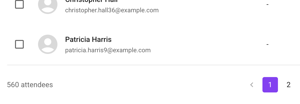
- In the attendee list, the total number of attendees can now be find at the bottom left of the table.
Bug fixes
- When using a custom login, the button to update its settings after changes are made now works as expected. The button can be found in the app settings on the tab Sign in.
- In the data types, the link icon on a schedule type now works. Before, nothing happened when you clicked it.